AI-Powered Research Tools: Are They Worth It for Literature Reviews?


In this week’s BAIC Center Newsletter:
AI Tool Testing – Jenna shares her hands-on experience with ResearchRabbit, an AI-based academic search platform. She compares it to her workflow using Google Scholar, breaking down the tool's strengths and weaknesses and offering practical recommendations for how it might complement traditional research approaches.
Updated BAIC website - Check out our updated BAIC website to learn more about the lab’s work and updates.
My Experience Testing Research Rabbit for Academic Literature Reviews
I’ve recently noticed the emergence of AI-based tools aimed at academics, many of which promise to streamline the research process. ResearchRabbit is one such platform, offering paper recommendations, citation-based search, and visualizations of connections across studies.
Though I remain loyal to Google Scholar and my lit review spreadsheets, I’m open to the possibility that these tools could complement, rather than replace, more traditional approaches. I tested ResearchRabbit to better understand where it might fit within my existing workflow and whether it offers any practical advantages for literature review.
Overview of Testing
Currently, our lab is recruiting for a new study examining how a ChatGPT-powered AI storytelling character interacts with neurodivergent children to co-create stories. I centered the lit review on this topic for this test.
Research Rabbit offers both free and paid versions. I used the free version for this test.
I focused on:
Finding relevant papers starting from a few keywords
Exploring connections between studies
Evaluating whether this tool could replace or complement my usual workflow
1. Set Up
After creating an account, I was prompted to enter a name for my project and was then taken to the home screen.
The home screen includes a search bar where users can enter an article title, DOI, keywords, or author name. There are also sections for recently saved papers and library collections, along with a sidebar featuring “What’s New,” which links to tutorial videos created by Research Rabbit.
2. Starting from Keyword Search
I began with a broad keyword search, similar to how I would typically start on Google Scholar when trying to get an initial sense of the literature.
Search entry: “neurodivergent children AI storytelling”
For comparison, I reviewed results from both Research Rabbit and Google Scholar.
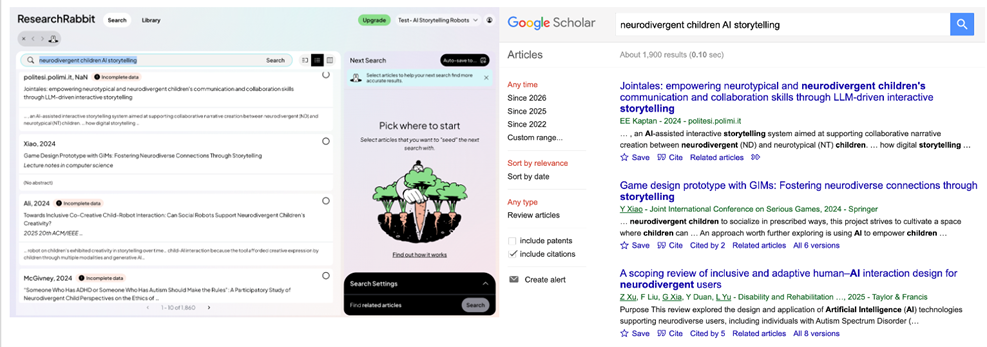
What I noticed:
Key information: Each result included the first author, publication year, journal, and a short abstract excerpt
Incomplete metadata: Many entries were flagged as having missing metadata. Although the tool claims access to over 270 million papers, it is unclear how comprehensive or up-to-date this database is
Coverage of newer papers: Google Scholar showed a couple recent papers that did not appear in ResearchRabbit
From this search, I selected six relevant papers, which were added to a sidebar for further exploration. The platform allows users to search based on these selected papers using different modes (e.g., Similar, References, Citations), with additional advanced options available in the paid version.
3. Exploring the Citation Graph
I first attempted a “Similar Articles” search (the default option) but encountered an issue where the graph was not generated.
Error message: “Nothing found — Try choosing more/different articles”
Based on guidance from Research Rabbit (which suggests including both foundational and recent papers), I expanded my selection to 11 papers and prioritized those with more complete metadata. This resolved the issue.
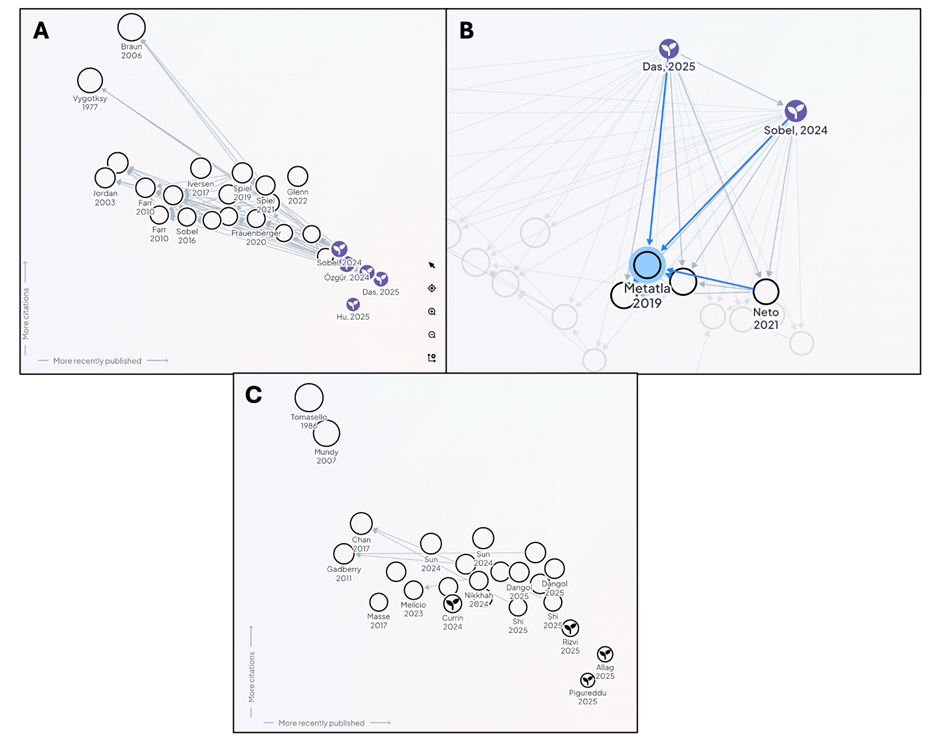
One of the main features of Research Rabbit is its interactive graph visualization, which displays relationships between seed papers and related work. I explored several graph types:
A) Similarity search (initial approach)
B) References search (more useful for my purposes)
C) After refining my keywords slightly (“neurodivergent children AI storytelling robot”), selected four more relevant papers. This produced a graph with fewer but more targeted connections.
My take: The visualization is engaging and does help highlight clusters of related work and shared references. However, the number of connections can become overwhelming, particularly with broader searches. I found the “References” mode to be the most useful, as it helped identify key papers that multiple studies cite.
4. Building Collections
I tested the collection feature by creating a main collection and a subcollection.
Research Rabbit allows exports in multiple formats: .csv (metadata) and .bibtex or .ris (for citation managers). Although a useful feature, missing metadata in the platform carried over into exported files, limiting their usability.
Overall, the collection system was intuitive and included features like color coding, batch saving papers, and sharing.
Key Takeaways
Strengths
Works well for early-stage literature exploration
Useful for identifying connections between papers and visualizing clusters within a field
Search history makes it easy to revisit prior explorations
Limitations
Incomplete metadata across many entries which can limit other functions
Misses some newer publications compared to tools like Google Scholar
Less suited for building complete citation lists or doing in-depth synthesis
Some useful filtering features (e.g., date range) are restricted to the paid version
Final Verdict: Would I use this in my workflow?
I could see using it occasionally for specific tasks, but not as a primary tool.
Author: Jenna Chin
Our BAIC website has recently been updated. Check it out to see our latest studies on how AI chatbots and AI systems are shaping young people’s relationships, development and well-being.